Beyond C: Wrapping Dear ImGui in Swift with Zero FFI
· 5 min read
A few days ago I wrote and published a blog post about how Swift interacts with C projects, using Raylib.
Somehow, much to my delight, it has been posted on multiple social networks, like Reddit and Hackernews.
Comments were interesting and constructive.
Many people praised how Swift manages interactivity with Raylib, but a few expressed their disappointment about the lack of demonstration on how to interact with a C++ project.
Yesterday, again, I was bored. So I tried.
Like the previous one this article is for demonstration purpose only.
I will not demonstrate this time how to build a WASM version of the finished project, most particularly because some exciting changes are coming in the Swift WASM ecosystem and I am waiting for those changes before doing the WASM build.
Swift <3 Dear ImGui #
This time I decided to integrate Dear ImGui into my (very simple) project.
Raylib will be used to initialize the window, initialize the screen, clear it, and draw some text.
ImGui, compared to Raylib, will be used to draw some GUI (used mainly for very useful menus to interact with the core of your program).
Last time I discussed how easy integrating Raylib was: dropping the main header file of Raylib and its static library, and let the compiler and package manager do their magic.
But how is it different compared to Dear ImGui, a C++ project?
The project structure #
The project structure does not change that much.
I included a static build of Dear ImGui (including rlImGui, which is a Raylib integration with DearImGui), and the headers of both Dear ImGui and rlImGui.
That folder (ImGui) will be dedicated to being a Clang module, as Raylib was previously.
Package.swift
Sources/
    ImGui/
        macOS/
            dearimgui.a
        imconfig.h
        imgui.h
        imgui_internal.h
        ...
        module.modulemap
    CRaylib/
        macOS/
            libraylib.a
        WASM/
            libraylib.a
        raylib.h
    MyGame/
        main.swift
Again, I declare a module.modulemap in this folder, to help the compiler make the bridge between the Clang module and Swift:
module ImGui [system] {
    header "imgui.h"
    header "rlImGui.h"
    link "imgui"
    export *
}
Compared to Raylib I exported two headers here: imgui.h to interact with Dear ImGui, and rlImGui.h for rlImGui (as a reminder: the bridge between Raylib and Dear ImGui).
The Package.swift file #
As with Raylib, I explicitly define a new target called imgui, which has a dependency to raylib:
// swift-tools-version: 6.2
import PackageDescription

let package = Package(
    name: "MyGame",
    targets: [
        // Raylib
        .target(
            name: "craylib",
            path: "Sources/CRaylib",
            publicHeadersPath: ".",
            linkerSettings: [
                .unsafeFlags(["-L", "Sources/CRaylib/macOS"], .when(platforms: [.macOS])),
                // Link required macOS graphics frameworks
                .linkedFramework("OpenGL", .when(platforms: [.macOS])),
                .linkedFramework("Cocoa", .when(platforms: [.macOS])),
                .linkedFramework("IOKit", .when(platforms: [.macOS])),
                .linkedFramework("CoreVideo", .when(platforms: [.macOS])),

                // WASM only
                .unsafeFlags(["-L", "Sources/CRaylib/WASM"], .when(platforms: [.wasi])),
            ]
        ),
        // NEW: ImGui integration
        .target(
            name: "imgui",
            dependencies: ["craylib"], // Usage of rlImGui, which needs a dependency to the Raylib Clang module
            path: "Sources/ImGui",
            publicHeadersPath: ".",
            linkerSettings: [
                .unsafeFlags(["-L", "Sources/ImGui/macOS"], .when(platforms: [.macOS])),
                .linkedLibrary("c++", .when(platforms: [.macOS])), // This time I use a C++ library, so I want the C++ standard library linked to that module
            ]
        ),
        .executableTarget(
            name: "MyGame",
            dependencies: ["craylib", "imgui"], // Now my project has two dependencies: Raylib and Dear ImGui
        ),
    ]
)
Let’s run it #
Ok, now, I have to change the Swift main.swift source to use our new dependencies.
import CRaylib
import ImGui

let screenWidth: Int32 = 1200
let screenHeight: Int32 = 800

InitWindow(screenWidth, screenHeight, "Swift + Raylib + ImGui")

SetTargetFPS(60)

let rayWhite = Color(r: 245, g: 245, b: 245, a: 255)
let darkGray = Color(r: 80, g: 80, b: 80, a: 255)

rlImGuiSetup(true)
var showDemoWindow = true
while !WindowShouldClose() {
    BeginDrawing()

    ClearBackground(rayWhite)
    DrawText("It's alive... ALIVE!", 300, 300, 20, darkGray)

    rlImGuiBegin()

    if showDemoWindow {
        ImGui.ShowDemoWindow(&showDemoWindow)
    }

    rlImGuiEnd()

    EndDrawing()
}

rlImGuiShutdown()
CloseWindow()
The code is very simple: I spawn a native window, setup using Raylib, and then draw some text and display the Dear ImGui demo window.
Let’s run that make run-mac command and…
[...]
<unknown>:0: error: too many errors emitted, stopping now
/Users/me/Devel/craylib/Sources/MyGame/main.swift:4:12: error: could not build Objective-C module 'ImGui'
 2 |
 3 | #if os(macOS)
 4 |     import ImGui
   |            `- error: could not build Objective-C module 'ImGui'
 5 | #endif
 6 |

make: *** [Makefile:17: run-mac] Error 1
Oh no.
Upgrading the Clang Importer #
What happened?
Swift uses a built-in tool called the Clang Importer to import Clang modules and maps the C or Objective-C APIs for Swift.
This means that the Clang Importer looks at our files, sees C++ keywords like namespace, class, template, completely panics, and throws an error saying it doesn’t recognize the syntax.
This explains why I can easily compile C code, and not C++ code…
Thankfully the Swift community managed to make the “translation” for C++ since Swift 5.9 using the interoperabilityMode Swift build setting. This setting enables C++ interoperability for a given target.
interoperabilityMode has to be enabled in our executable settings, so:
let package = Package(
    name: "MyGame",
    targets: [
        ...
        .executableTarget(
            name: "MyGame",
            dependencies: ["craylib", "imgui"],
            swiftSettings: [
                .interoperabilityMode(.Cxx) // tells Swift to parse C++ directly
            ]
        ),
    ]
)
Now, does this compile?
Let’s run it (2) #
Ok, let build and run it again, and…
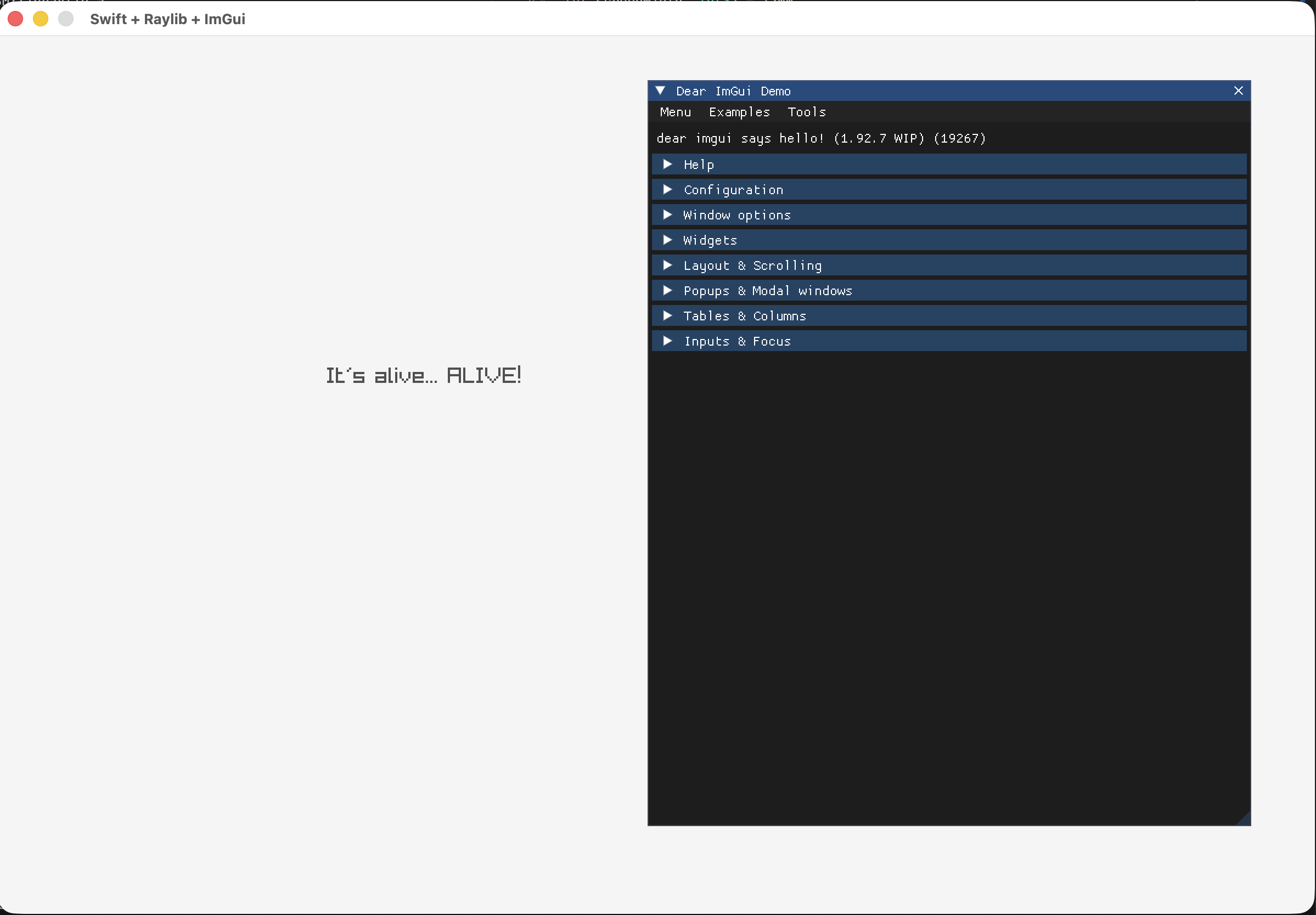
Mission completed!
Conclusion #
Wrapping DearImgui for Swift, a C++ project, was as straightforward as wrapping Raylib. The subtle difference is simply enabling the C++ interoperability in the package configuration, which is just a matter of a simple Google search (or in your favorite LLM).
I guess people will argue that this project is not complex or big enough to make assumptions. And they are right!
But this is a start, and I don’t plan on stopping there…
Link to the Github project: https://github.com/k0pernicus/swift-c-raylib.